Inkpad Notepad & To do list
- 4.5
- Rating
- 10.00M
- Installs
- Free
- Price
 Analysis by App-foxy
I reach for a notepad app when I need to capture something before it disappears: a shopping item, a short reminder, a few lines for later, or a simple task I do not want to keep in my head. Inkpad Notepad is built around that uncomplicated habit. It is a free productivity app from Workpail that keeps the focus on writing text notes, to-do notes, and shopping notes rather than turning every small thought into a project-management exercise.
After spending time with it, my impression is clear: this is most useful when you want a lightweight place for quick written information. It feels closer to a digital pad of paper than to a full office suite or team task manager. That simplicity is its main appeal, but it also defines the situations where I would choose something else.
What Inkpad Notepad is really designed to do
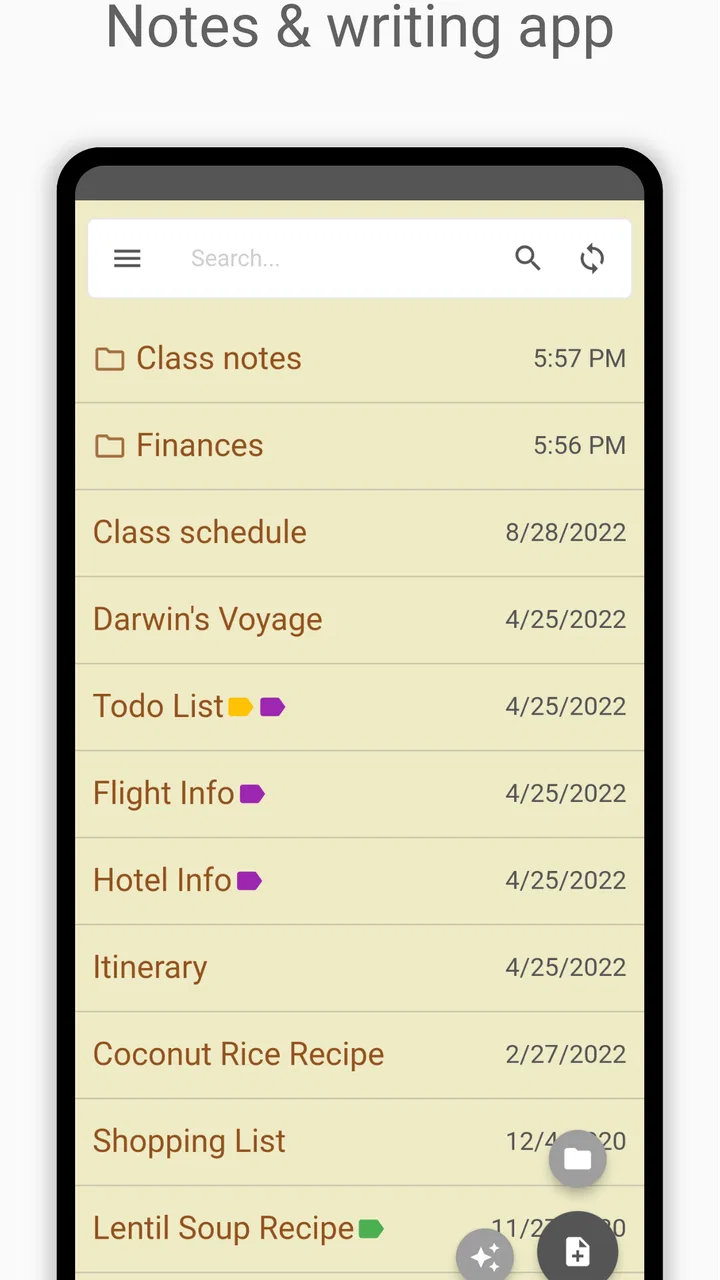
The app’s purpose is easy to understand. You open it, create a note, and write. That makes it suitable for small pieces of information that do not deserve a complicated workflow. A short list before visiting a supermarket, a few errands for the day, or an idea you want to develop later can all fit naturally into the same basic environment.
You May Also Like

 Blood Strike: 2.5 Anniversary
Blood Strike’s Loadouts Turn Every Drop Into a Tactical Gamble
A close look at Blood Strike’s custom loadouts: how fast access to signature weapons reshapes its battle royale rhythm, rewards preparation, and narrows the gap between fights.

 Pandora - Music & Podcasts
Pandora’s Music Is Easy to Start, but Harder to Recover
Pandora’s strength is its low-effort path from a seed to a station. Its weak spot is how much confidence it asks you to place in connection, setup, and quiet recovery.

 8 Ball Pool
 Is Built on Rivalries, Rematches, and Routine
A close look at the rivalries, rematches, shared routines, and unanswered safety questions that turn a quick pool match into a persistent mobile community.

 Samsung Music
’s Quiet Strength Is Playing What You Already Own
Its reach comes less from spectacle than from dependable access to a personal library. That simplicity is both the app’s strongest retention engine and its ceiling.

 AccuWeather: Weather Radar
AccuWeather Review: A Quick, Clear Forecast for Everyday Decisions
For everyday plans, the best forecast is the one you can understand quickly. AccuWeather makes rain timing, radar, and local conditions easy to act on, with a few trade-offs.

 Hill Climb Racing
Why Hill Climb Racing Still Turns Crashes Into One More Run
A tiny car, a bumpy hill and one more upgrade: Hill Climb Racing keeps resurfacing because its simple chaos makes every near-miss feel personal.
More From Our News Desk
View All News


I like this approach because many productivity tools ask me to decide too much before I can record anything. I may need to choose a project, assign a label, set a due date, select a priority, or organize a page. Inkpad Notepad is aimed at the opposite experience: write first, organize only as much as the note requires.
Its store summary specifically centers on text notes, to-do notes, and shopping notes. Those examples are useful because they show the app’s sweet spot. It is not trying to replace a calendar, a collaborative workspace, or a document editor. It is for the everyday scraps of information that are important enough to save but too small to justify a heavier system.
The app sits in the productivity category, and that description fits better than calling it a general writing tool. The notes are practical and action-oriented. Even when I use a note for free-form text, I tend to think of it as something I will consult, edit, or complete rather than a polished document I will publish.
Cost, access, and what the purchase range means
Inkpad Notepad is free to install and use as a starting point, which makes it easy to test without committing money first. That matters for a basic note-taking app because the main question is not whether it can produce impressive documents; it is whether its writing flow feels comfortable enough to become part of your daily routine.
There are in-app purchases ranging from $1.99 to $239.99 per item. I would not treat that range as a single promise about what every user needs. The practical takeaway is to check the purchase screen carefully before paying and to judge any optional upgrade against the way you actually use the app. If the free experience already handles your short notes and lists, spending more may not add meaningful value for you.
This is an important distinction: the free access gives you a chance to evaluate the core idea, while paid value depends on the particular option presented in the app and whether it solves a problem you genuinely have. I would not buy anything simply because the app has been installed by many people. I would first use it for a week of real notes, then decide whether the available purchase improves my own workflow.
The app is rated for Everyone, so it is presented as suitable for a broad audience. That matches the straightforward concept. There is no need to understand specialist terminology to begin, and a child, student, parent, or older user can approach it as a place to write down information. The suitable audience is broad, but the best fit is still someone who values simplicity over advanced organization.
How it fits into a normal day
A realistic example is a Saturday shopping trip. I might create one note for groceries, another for household tasks, and a third for an idea about a meal. The shopping note can stay focused on items, while the to-do note can hold errands in the order I expect to handle them. This separation is more useful than putting everything into one long stream, because I can open the relevant note without scanning unrelated thoughts.
The same pattern works during a busy workday. I can keep a short list of calls to make, capture a sentence for a future email, and write down a reminder about something I noticed. The benefit is not sophisticated automation; it is reducing the number of details I must remember while moving between tasks.
One practical habit I recommend is creating notes by purpose instead of by date. A note called “things to buy” can remain useful across several trips, while a note called “Tuesday” may become confusing once the day has passed. For temporary planning, date-based notes make sense. For recurring errands or household information, a stable subject is easier to revisit.
Another useful habit is writing the next action rather than a vague label. “Return package” is more helpful than “package,” and “ask about appointment time” is clearer than “appointment.” A simple notepad rewards precise wording because it does not necessarily impose structure for you. The quality of the result depends partly on how clearly you write.
Where the simple design helps
The strongest advantage is low mental overhead. When I only need to capture a thought, a basic note is often faster than a system built around projects and deadlines. This makes the app appealing for people who have tried feature-heavy planners and abandoned them because maintaining the system became another chore.
It also works well for mixed personal notes. A shopping list, a short checklist, and a paragraph of reminders do not need to be treated as separate types of documents. Keeping them in one familiar note-taking space can make the app easier to approach throughout the day.
The text-first format is another strength. I would choose it for instructions I need to read quickly, a list of questions before a visit, or a rough outline that is not ready to become a formal document. The app’s value appears in these small moments, where speed and clarity matter more than presentation.
There is also a useful psychological benefit to keeping a note deliberately small. Instead of creating an elaborate plan for a simple errand, I can write the few actions that matter and move on. For people who become distracted by organizing productivity tools, this restraint may be more valuable than a long feature list.
Trade-offs you should understand before relying on it
The same simplicity that makes Inkpad Notepad approachable can become limiting when your information grows. If you need detailed project planning, dependencies, recurring schedules, shared assignments, or structured databases, a dedicated task manager will probably be a better fit. A notepad can hold those details, but holding information is not the same as managing it efficiently.
I would also be cautious about using a basic note app as the only home for important records. A personal archive may require stronger organization, search, export, synchronization, or recovery tools than a lightweight notepad provides. Before storing irreplaceable material, I would check how the current version handles the specific workflow I depend on and keep another copy when the information truly matters.
Long writing projects are another borderline case. You can begin an article, journal entry, or set of research notes in a notepad, but a document-focused app may offer a more comfortable environment for extensive editing and presentation. Inkpad Notepad makes more sense for drafts and fragments than for a final manuscript.
There is a trade-off between flexibility and consistency. A blank note lets me write almost anything, but it does not automatically tell me how to structure it. If I create many notes with unclear names, finding the right one later can become frustrating. My solution is to use direct titles, keep one purpose per note, and occasionally remove notes that no longer have a job.
The purchase range also deserves restraint. Because the app is free to start, I would not assume that every paid item is necessary for ordinary note-taking. The right question is not whether an upgrade exists, but whether it addresses a limitation I have personally encountered. That approach keeps the cost decision grounded in use rather than impulse.
Useful workflows beyond a basic shopping list
One workflow I find effective is the “capture, clarify, close” routine. I first write the thought exactly as it arrives, then return later to turn it into a clearer action or a short reference note. This prevents interruptions from becoming long organizing sessions. The app is well suited to the capture stage because a quick text entry is less demanding than building a complete task.
A second workflow is using separate notes for different levels of urgency. I might keep one note for actions that need attention today, another for things I want to remember during the week, and a third for ideas with no deadline. The important part is not the labels themselves; it is preventing urgent items from being buried among harmless ideas.
A third approach is to use a note as a checklist for a repeated situation, then edit it instead of starting from nothing each time. For example, a travel-preparation note can contain the items I often forget, while a home-maintenance note can hold recurring checks. I would remove completed temporary items before reusing the note so that old details do not cause mistakes.
For shared household planning, I would treat the app as a personal preparation tool unless the current sharing behavior meets your needs. I can draft the list in one place, but a family that needs simultaneous edits, assigned responsibilities, or visible completion status may be happier with a collaborative service. That is not a flaw in a simple notepad; it is a boundary worth recognizing.
Who is likely to get the most value
I think the best users are people who want a quick, familiar writing space without learning a complicated productivity method. Students can use it for small study reminders and questions to review. Parents can keep compact household lists. Workers can capture talking points, errands, and rough ideas between meetings. Anyone who regularly says “I’ll remember that” and then does not may benefit from putting the thought somewhere dependable.
It is also a reasonable choice for someone moving away from paper notes. The mental model is familiar, but the phone is easier to carry and consult. The free starting point lowers the risk of trying it, especially if you are unsure whether a digital note habit will stick.
I would recommend skipping it if your main requirement is a sophisticated task system. People who need calendar integration, team collaboration, detailed reminders, document formatting, or a carefully structured knowledge base should compare it with tools built specifically for those jobs. A simple app can be pleasant, but forcing it to behave like a project manager usually creates unnecessary work.
I would also skip it as a primary choice if you need a polished writing environment for lengthy documents. A notepad is excellent for collecting material, but extended editing can expose the difference between quick capture and full document production. Choosing the lighter tool is sensible only when your notes remain relatively small and practical.
How it compares with common alternatives
Compared with a paper notebook, Inkpad Notepad is easier to keep with you when your phone is already in hand, and text can be revised without crossing out old lines. Paper remains attractive for people who think better by handwriting or want a completely offline, distraction-free object. The choice depends less on features than on which medium you will actually use consistently.
Compared with a phone’s default notes app, the appeal here is its clear emphasis on notepad-style productivity and lists. If your built-in app already gives you the exact writing experience you want, switching may not be worthwhile. Inkpad Notepad becomes more interesting when you prefer its focused approach or want a separate space for practical notes rather than mixing them with every other kind of saved content.
Compared with a full task manager, this app is quicker for unstructured capture and weaker for tracking complex commitments. A task manager earns its extra complexity when deadlines, reminders, recurring work, and status matter. Inkpad Notepad earns its place when the note itself is enough.
Compared with a document editor, it is better suited to short fragments and lists than to polished pages. I would use a document editor for formatting and long-form revision, then keep Inkpad Notepad for the early, messy stage when I am collecting thoughts or outlining actions.
My verdict on value
Workpail has kept this app available as a productivity option since February 13, 2011, and its current reach suggests that the straightforward concept has found a substantial audience. It has over ten million installs, an average rating of 4.5 from around 251 thousand ratings, and roughly 52 thousand written reviews. Those figures do not decide whether it suits me, but they do show that the basic notepad idea has broad appeal.
For me, the value comes from reducing friction. I can use the free app as a place for quick notes and lists without first designing a personal productivity system. That is enough reason to try it if your needs are modest. The optional purchases should be considered separately, with attention to the exact benefit and the listed cost rather than an assumption that paying is required for everyone.
My buy-or-skip verdict is simple: try the free experience first, then pay only for a clearly useful improvement. Choose Inkpad Notepad if you want a practical, low-pressure place for text notes, to-do items, and shopping lists. Skip it if your daily work depends on advanced planning, collaboration, formal documents, or a deeply organized personal database.
In the right hands, this is not a replacement for every productivity tool; it is a dependable landing place for small pieces of information. I would recommend it to a friend who wants less fuss and more immediate writing. I would not recommend building an entire complex workflow around it when a specialized app would handle that job more cleanly.
FAQs for Inkpad Notepad & To do list
01What is Inkpad Notepad & To do list used for?
Inkpad Notepad & To do list is a note-taking and task-management app designed for writing quick notes, organizing ideas, creating checklists, and tracking everyday reminders. After reviewing its layout, the app feels focused on simplicity rather than advanced project management. It can be useful for shopping lists, personal reminders, study notes, work details, and other information you want to keep organized in one place.
02Does Inkpad Notepad & To do list synchronize notes across devices?
Synchronization depends on the version of the app, your account configuration, and the platform you are using. Before relying on Inkpad for important information, check whether cloud syncing is available and confirm that it is enabled correctly. Users changing phones should also verify that their notes have been backed up or synchronized, because locally stored notes may not automatically transfer to a new Android or iOS device.
03Can I use Inkpad Notepad & To do list without an internet connection?
The basic writing and checklist functions are generally intended to work offline, making the app convenient for recording information while traveling or when mobile data is unavailable. However, features involving synchronization, account access, backups, or sharing may require an internet connection. It is recommended to reconnect periodically so any pending changes can be saved or synchronized properly.
04Is Inkpad Notepad & To do list easy for beginners to use?
Yes, the app is aimed at users who want a straightforward way to write notes and manage simple tasks without learning a complicated system. Its practical design makes it suitable for beginners, students, families, and anyone moving away from paper lists. More experienced users may find it less suitable if they need advanced formatting, large team workspaces, detailed project views, or extensive productivity integrations.
05Are my notes and personal details safe in Inkpad Notepad & To do list?
You should review the app’s current privacy policy, permissions, backup options, and account settings before storing sensitive information. Notes may be saved locally, synchronized online, or handled through third-party services depending on the version installed. Avoid entering passwords, financial details, or confidential documents unless you understand how the app protects and stores your data, and keep your device secured with a passcode.
Pros
- Clean
- distraction-free interface for quick note-taking.
- Supports checklists
- making it useful for tasks and shopping lists.
- Notes are easy to organize and find when needed.
- Lightweight app that runs smoothly on most devices.
- Useful for capturing ideas without unnecessary complexity.
Cons
- Some advanced features may require a premium upgrade.
- Sync options can be limited compared with larger note platforms.
- Formatting tools are fairly basic for detailed documents.
- Backup options may not satisfy users with extensive note archives.
- The interface may feel dated beside newer note-taking apps.

Inkpad Notepad & To do list
Gallery